Data flow
From Notifications to Datasets
The downstream protocol of mCube is triggered by notifications. Via a notifications interface, multiple types of Documents (see here for “Document”, “Indexes”, “Dataset”, and “Data Item” definitions) are pushed to mCube where they are indexed in the Catalogue as:
- Workspace,
- Areas,
- Acquisitions.
The Ingestion component of mCube is the entry point for recording new Documents in the database. Once in the mCube Database, those Documents become Data Items for the platform. In this protocol, the Catalogue is the component that allows users to search for Data Items filtering their Metadata properties like the sensing time and area of interest, the orbit number and direction and many other sensor-specific fields of source EO data.
In mCube the Data Collections menu is the main entrance for search in the different collections of Data Items. This menu is located in the top bar of the mCube GUI and is organized in multiple data collections (also called data contexts), which are dynamically managed with respect to the Activation information (zones, type and the related Acquisitions and Value Added Products available. In particular, it contains the following types of Data Collections:
-
Acquisitions: Earth Observation Products ingested by the system that may be grouped by mission, sensor type or any other metadata.
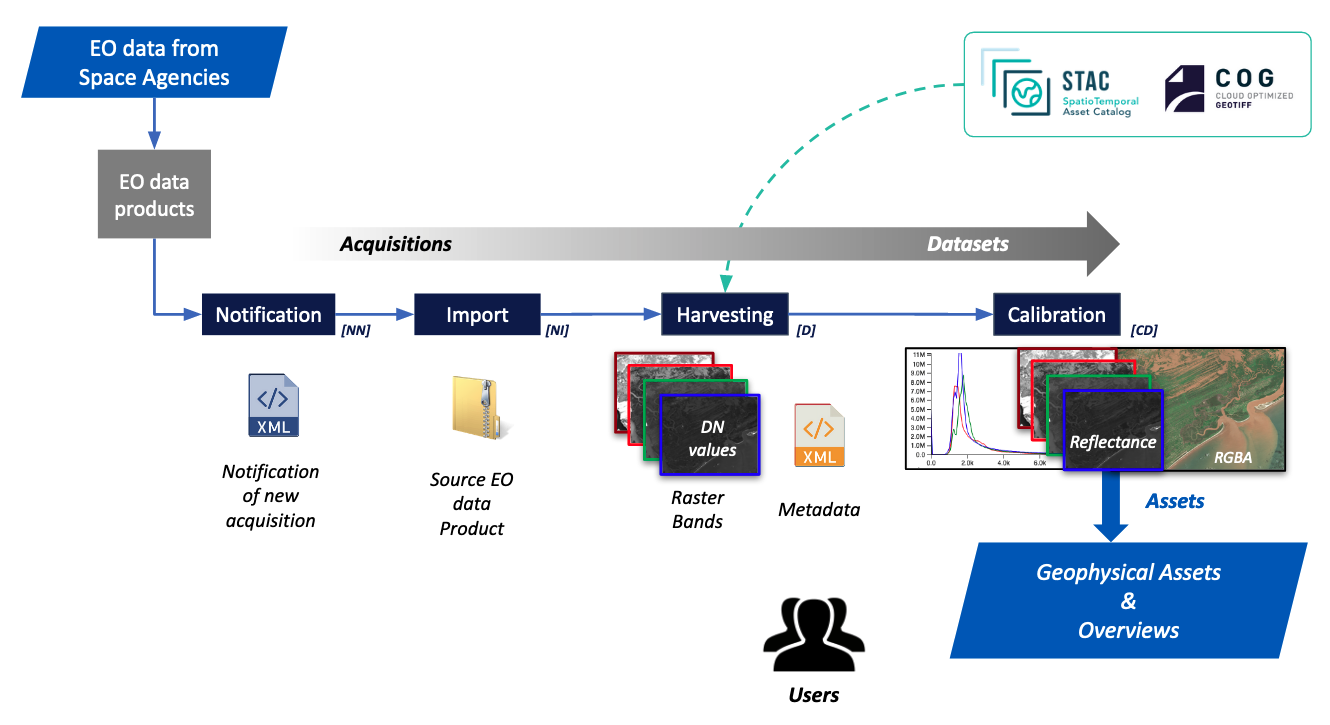
- Notifications: This collection contains all the acquisitions in their early stage in the system. As soon as a notification is received, a corresponding entry is available in this collection as Notification New [NN]. In this collection, items are tagged as Notification Imported [NI] when a proper data file has been copied using the reference in the notification. In case it is not possible to download the EO data from source or only the metadata is available in the downloaded EO product mCube generates respectively a Notification Missing Data [NMD] or a Notification Metadata Only [NMO].
-
Datasets: This collection contains all the imported and calibrated datasets that have been properly harvested for its metadata. This collection is primarily meant to contain all the dataset for which a successful calibration process has been performed. It also includes not calibrated datasets: SAR SLC images, and EO data for which the calibration has not been possible (e.g. due to missing metadata at source).
-
Upload EO data: This function allows to gather, upload and the ingest external satellite imagery from open EO data collections (Sentinel-1 GRD, Sentinel-2 MSI L1C and L2A).
-
My results: This collection include all results obtained from the User in the Workspace.
-
Areas: Point of interest with Project details, Areas of Interesr identified by the Project Manager.
At first opening the Workspace has the Data Collection “Dataset” enabled by default and, as a result, all found and notified acquisitions that have passed the 2 essential preliminary steps (import + harvesting + calibration) to become a Dataset are presented to the user. Datasets are listed in the Results tab (see following section about Search and Results tab) with full metadata available. By selecting instead the “Activation” Data Collection the Results panel is then refreshed and only the list of all notifications is given.
Acquisition Data flow
In a Workspace, the Acquisition Data Flow begins via an acquisition notification source data provider. A new entry is then created and imported into the Catalogue and tagged as notification. As a result, a New Acquisition Notification is also available in the Portal (footprint visible on the map and basic metadata).
Once source EO data is found, and successfully imported in mCube, data is copied into the storage. After this step a new Imported Acquisition Notification is then published into the mCube Portal and the associated acquisition quicklook is visible in the map.
Later, the Metadata harvesting enables the creation of the Dataset in mCube and the acquisition of source EO data is completed. After these steps, an initial processing is performed to calibrate the dataset and make it ready for further generic processing.
As a result, a new Calibrated Dataset (either Optical or SAR) is then available for the user and ready for scenario systematic processing (see here) and on-demand processing in mCube for the creation of different types of output Products.